4Step 4 of 4
Play online: a tour of the ONLINE menu
RaveM is installed. This page walks through the ONLINE menu: finding a match, hosting one, the lobby, voting, voice chat and every default key.
Open ONLINE
From Ravenfield's main menu, open PLAY > ONLINE. Three tabs run along the top: SERVER BROWSER, HOST GAME and PREFERENCES. Inside a lobby they become LOBBY, VOTE and PREFERENCES. The label at the top right always shows the RaveM version you're running.
These screenshots were taken with RaveM 1.5.2. In 1.7.1 the version label in the top-right corner reads RaveM 1.7.1. SERVER BROWSER has a DIRECT CONNECT button at the bottom for LAN games, MODE OPTIONS now also lists RaveM's own killcam, spawning, match and ballistics options after the game mode's, and PREFERENCES has a fourth page, KILLCAM & SPAWNING.
Join a match
 (opens the full-size 1920 by 1080 image)
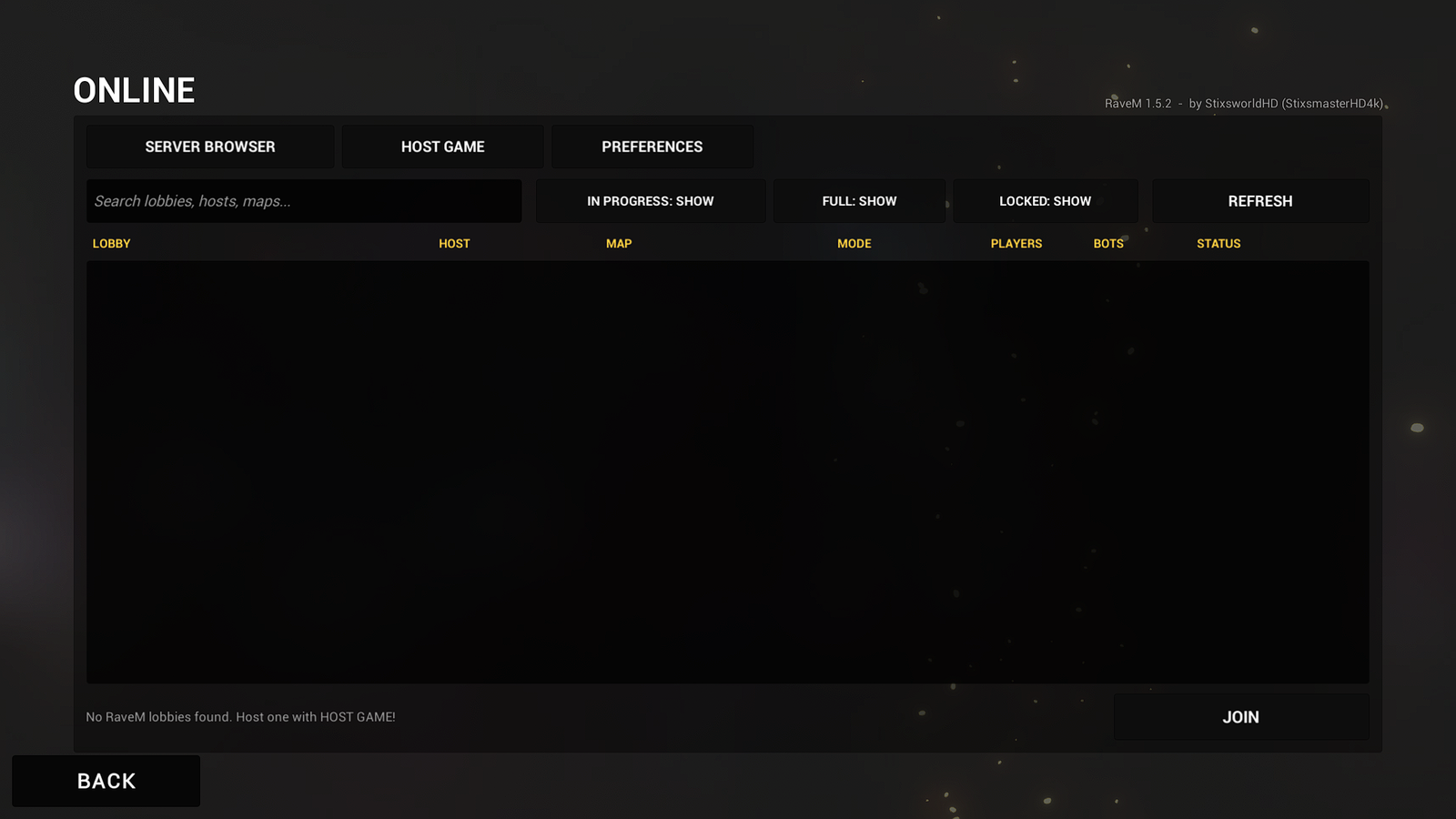
SERVER BROWSER lists the RaveM lobbies Steam returns. Search by lobby name, host or map. The three filters show or hide matches IN PROGRESS, FULL lobbies and LOCKED (password-protected) lobbies. REFRESH reloads the list, which also refreshes itself every 15 seconds while it's open.
To join, double-click a lobby, or select it and press JOIN. A locked lobby asks for its password. Steam invites work too: accept a friend's invite, or join them through the Steam overlay.
LAN games (since 1.7.0) appear in the same list, marked [LAN] with their ping, while the browser probes your network every 3 seconds. DIRECT CONNECT at the bottom joins any address: an IP, a host name, ip:port or [IPv6]:port, plus the password if there is one. The last 8 addresses are remembered. How LAN play works.
| STATUS | What it means |
|---|---|
| IN LOBBY | Waiting in the lobby. Join now. |
| IN PROGRESS - JOIN | The match is running and the host allows joining: you load the map and spawn like everyone else. |
| IN PROGRESS | The match is running and the host doesn't allow joining. It becomes joinable when the host returns to the lobby. |
| FULL | No free player slots. |
| VERSION | The lobby runs a different RaveM protocol and can't be joined. Everyone needs RaveM 1.7.1. |
Missing maps or mods
If a lobby uses a Steam Workshop map or mods you don't have, RaveM's Workshop window opens before you connect. It lists each item with a link to its Workshop page and a one-click GET that downloads it at high priority (GET ALL takes everything). Wait until every row says Downloaded, restart Ravenfield, then join again: Ravenfield only loads new Workshop content when it starts. JOIN ANYWAY continues without them. In a lobby, MISSING CONTENT opens the same window.
Host a match
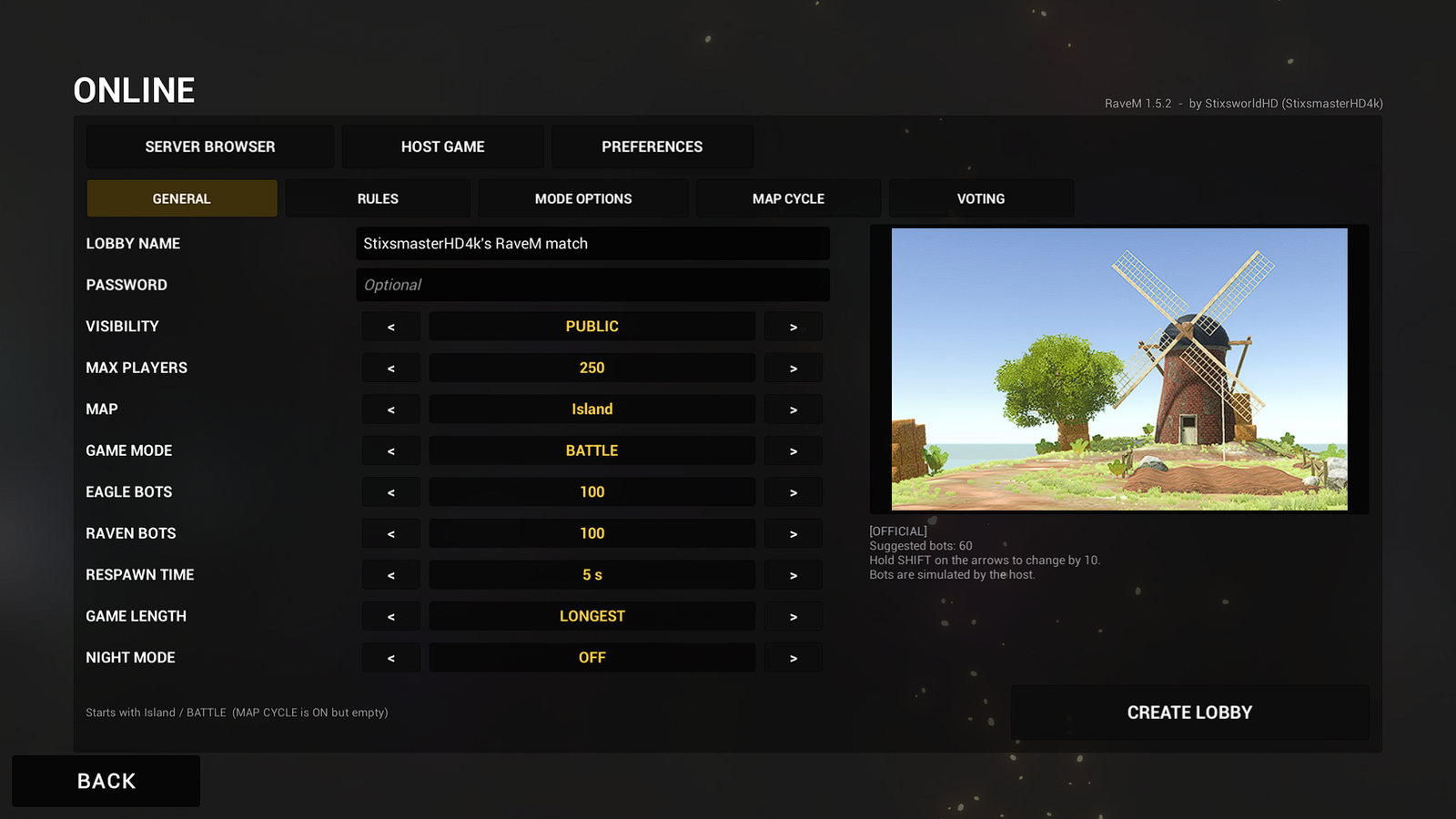
Open HOST GAME, set up its five tabs, then press CREATE LOBBY. A progress box turns into your lobby once it's ready.
GENERAL
 (opens the full-size 1920 by 1080 image)
Lobby name, an optional password, visibility (PUBLIC, FRIENDS ONLY, INVITE ONLY or LAN (NO STEAM LOBBY)), max players from 2 to 250, map, game mode, bots for each team (EAGLE BOTS, RAVEN BOTS), respawn time, game length and night mode. Hold Shift on the arrows to change numbers by 10. The panel on the right shows the map and its suggested bot count.
With LAN (NO STEAM LOBBY) the game runs over your network instead of Steam: it listens on UDP port 48780, and the lobby's LAN ADDRESS button, in place of INVITE FRIENDS, shows this PC's addresses for DIRECT CONNECT. The first time, Windows may ask whether to allow Ravenfield through its firewall: allow it on private networks, or no one can join.
RULES
 (opens the full-size 1920 by 1080 image)
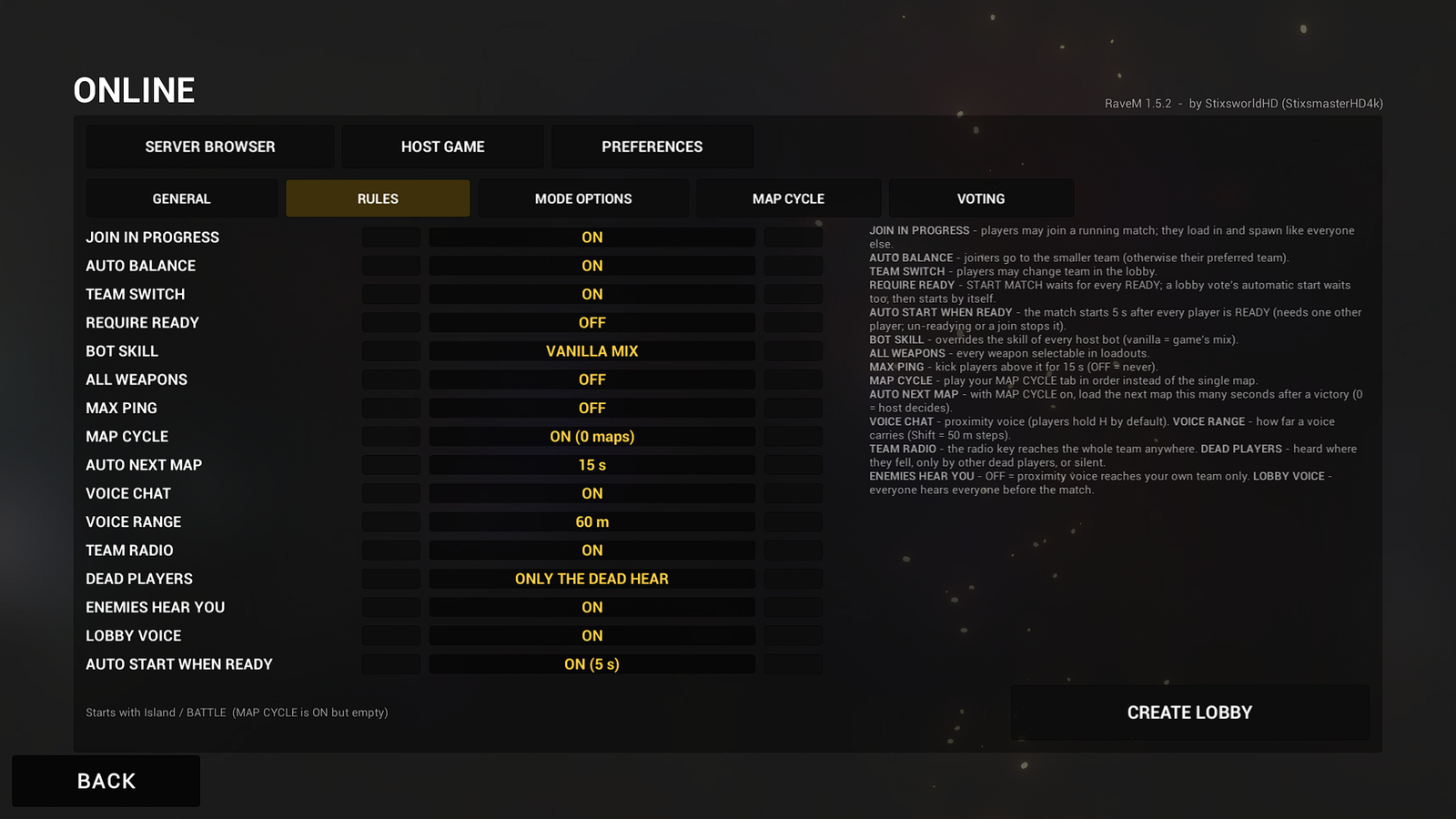
| Rule | Default | What it does |
|---|---|---|
| JOIN IN PROGRESS | ON | Players can join a match that is already running. They load the map, get the full match state and spawn normally. |
| AUTO BALANCE | ON | New players go to the team with fewer players. It wins over a player's PREFERRED TEAM. |
| TEAM SWITCH | ON | Players may switch team in the lobby. |
| REQUIRE READY | OFF | START MATCH waits until every player has pressed READY. |
| BOT SKILL | VANILLA MIX | Sets the skill of every bot: beginner, normal or veteran. VANILLA MIX keeps Ravenfield's own mix. |
| ALL WEAPONS | OFF | Every weapon can be picked in loadouts. |
| MAX PING | OFF | Players above this ping for 15 seconds are kicked. |
| MAP CYCLE | OFF | Matches follow your MAP CYCLE tab in order instead of the single map. |
| AUTO NEXT MAP | 15 s | With MAP CYCLE on, the next map loads this many seconds after a match ends, whichever team won. 0 = the host decides. |
| VOICE CHAT | ON | Proximity voice chat in your lobby. |
| VOICE RANGE | 60 m | How far a voice carries, 10 to 300 m. Hold Shift for 50 m steps. |
| TEAM RADIO | ON | The team radio key reaches the whole team anywhere on the map. |
| DEAD PLAYERS | ONLY THE DEAD HEAR | HEARD NEARBY (where they fell), ONLY THE DEAD HEAR, or SILENT. |
| ENEMIES HEAR YOU | ON | Off: proximity voice only reaches your own team. |
| LOBBY VOICE | ON | Everyone in the lobby hears everyone before the match. |
| AUTO START WHEN READY | OFF | The match starts 5 seconds after every player is READY. Needs at least one other player; anyone un-readying or joining stops the countdown. |
The screenshot shows a host who changed MAP CYCLE and AUTO START WHEN READY from their defaults. Your rules are kept as your host defaults.
MODE OPTIONS
 (opens the full-size 1920 by 1080 image)
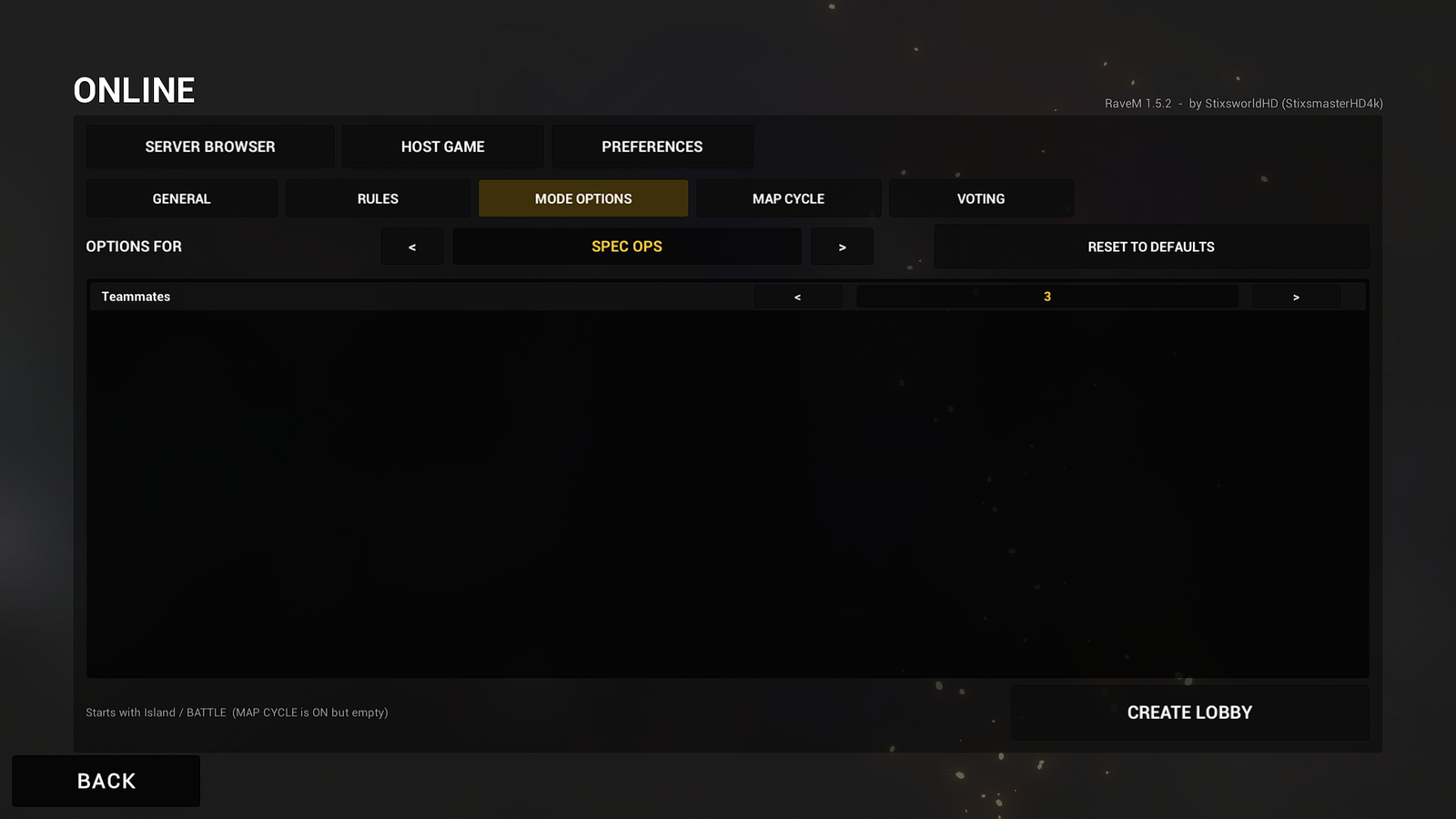
Settings for the chosen game mode, read from the mode itself, so modded game modes get their options too. Switch modes with the arrows beside OPTIONS FOR; RESET TO DEFAULTS restores the mode's own values.
Since 1.6.0, every game mode also gets options of RaveM's own after its own options: 25 in four groups as of 1.7.1. The screenshot above shows 1.5.2, from before they were added. They're stored per game mode, saved as that mode's options and sent to every player with the match, and RESET TO DEFAULTS resets them too.
| Group | Option | Default | What it does |
|---|---|---|---|
| KILLCAM | KILLCAM | ON | Killcams in this game mode. |
| KILLCAM | KILLCAM LENGTH | 6 s | How long a killcam lasts, 3 to 12 s. |
| KILLCAM | STARTS AFTER YOUR DEATH | 1.5 s | Delay between your death and the killcam, 0 to 3 s. |
| KILLCAM | SLOW-MO FINALE | 1 s | Slow motion around the kill, 0 to 3 s; OFF = none. |
| KILLCAM | SLOW-MO SPEED | 35 % | Replay speed during the slow-motion finale, 10 to 90 %. |
| KILLCAM | KILLCAM CAMERA | PLAYER'S CHOICE | Or one camera for everyone: KILLER'S EYES, OVER THE SHOULDER or CINEMATIC. |
| KILLCAM | KILLCAMS FOR BOT KILLS | ON | Killcams when a bot kills you. |
| KILLCAM | KILLCAMS FOR VEHICLE KILLS | ON | Killcams when a vehicle kills you. |
| KILLCAM | KILLCAMS CAN BE SKIPPED | ON | Players may skip with Backspace. |
| KILLCAM | FINAL KILLCAM AT MATCH END | ON | Everyone sees the match's last kill when it ends. |
| KILLCAM | SHOW THE KILLER'S HEALTH | ON | The killer's health at the kill appears in the killcam. |
| KILLCAM | BULLET TRACERS | ON | Tracers for every gun, mortar and tank shot. |
| SPAWNING | AUTO SPAWN | OFF | RaveM presses DEPLOY for dead players. |
| SPAWNING | AUTO SPAWN AFTER | 3 s | How long a player is dead before that, 1 to 30 s. |
| SPAWNING | WAIT FOR THE KILLCAM | ON | Auto spawn also waits until the player's killcam is over. |
| MATCH | HALLOWEEN MODE | OFF | Ravenfield's own Halloween match parameter. |
| BALLISTICS | BALLISTICS | ON | The master switch. OFF = vanilla projectiles and vanilla bot aim for everyone. |
| BALLISTICS | AIR DRAG | 1.0x | Slows fast projectiles over distance, 0 to 5x in 0.5 steps; OFF = no drag. |
| BALLISTICS | DRAG ON PROJECTILES FASTER THAN | 120 m/s | Only faster projectiles get drag and wind (bullets, not thrown objects). |
| BALLISTICS | WIND | 0.8 m/s | Crosswind strength, 0 to 10 m/s; OFF = no wind. |
| BALLISTICS | WIND BLOWS TOWARD | 45 deg | 0 = the map's +Z axis, 90 = +X, in 15-degree steps. |
| BALLISTICS | WIND GUSTS | 35 % | How much the wind strength varies over time. |
| BALLISTICS | BOT BALLISTIC AIM | ON | Bots solve the arc for weapons with bullet drop (rockets, grenades, sniping). |
| BALLISTICS | BOT AIM SKILL | 85 % | How closely bots follow the perfect solution. |
| BALLISTICS | BOTS LEAD MOVING TARGETS | ON | Bots aim ahead of a moving target by the projectile's travel time. |
How killcams work, what auto spawn does and how ballistics work are on the Features page. Every BALLISTICS default equals the settings file's old one.
MAP CYCLE
 (opens the full-size 1920 by 1080 image)
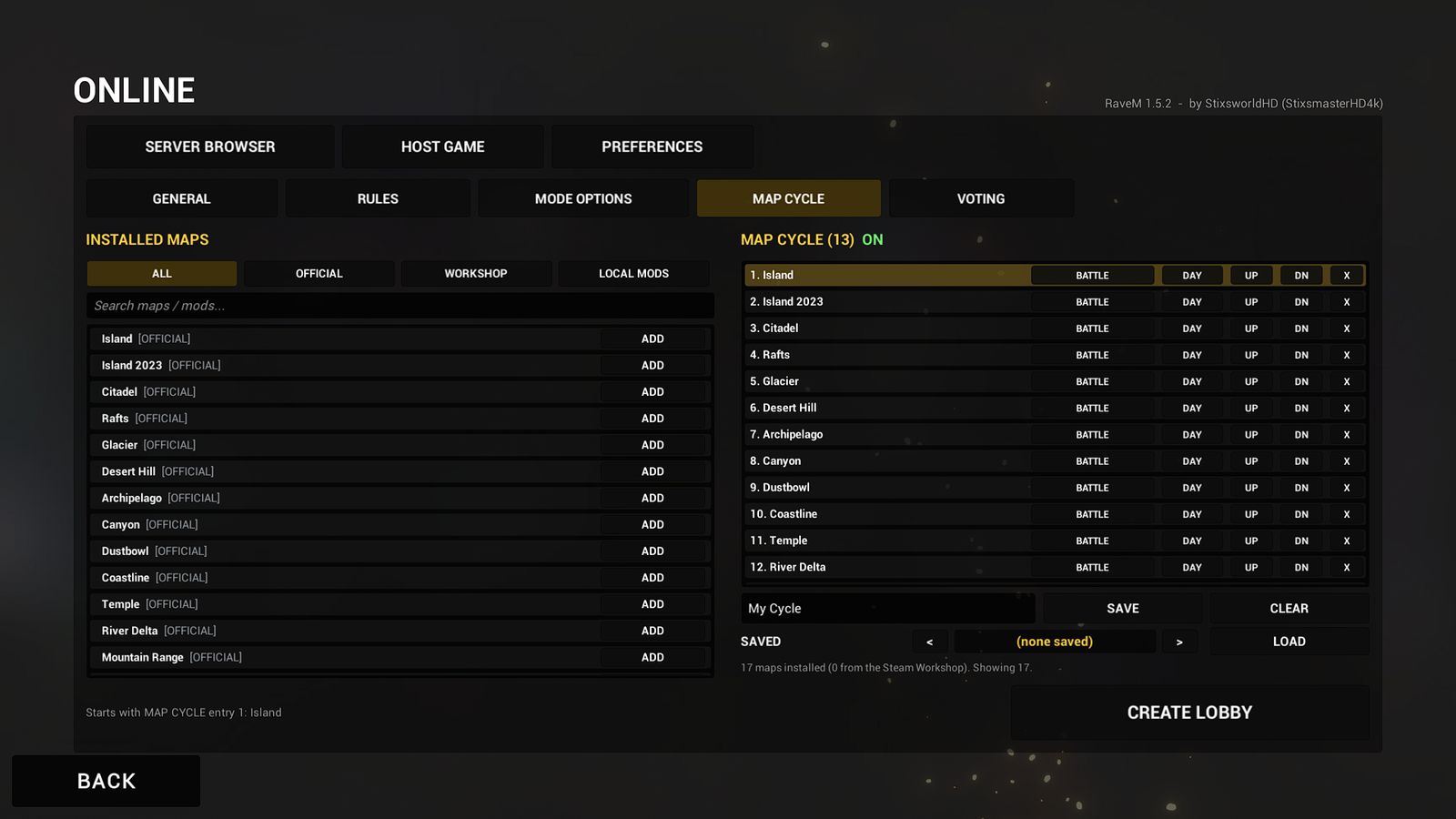
The left list shows every installed map, with ALL, OFFICIAL, WORKSHOP and LOCAL MODS filters and a search box; ADD puts a map in the cycle. Each entry on the right has its own game mode and DAY or night setting, UP and DN reorder it and X removes it. Type a name and press SAVE to keep the cycle; LOAD brings a saved one back and CLEAR empties the list. Adding the first map switches the MAP CYCLE rule on for you.
When a match ends, the host gets NEXT MAP, or the next map loads by itself after the AUTO NEXT MAP countdown. With VOTE AT MATCH END on, a vote decides instead.
VOTING
 (opens the full-size 1920 by 1080 image)
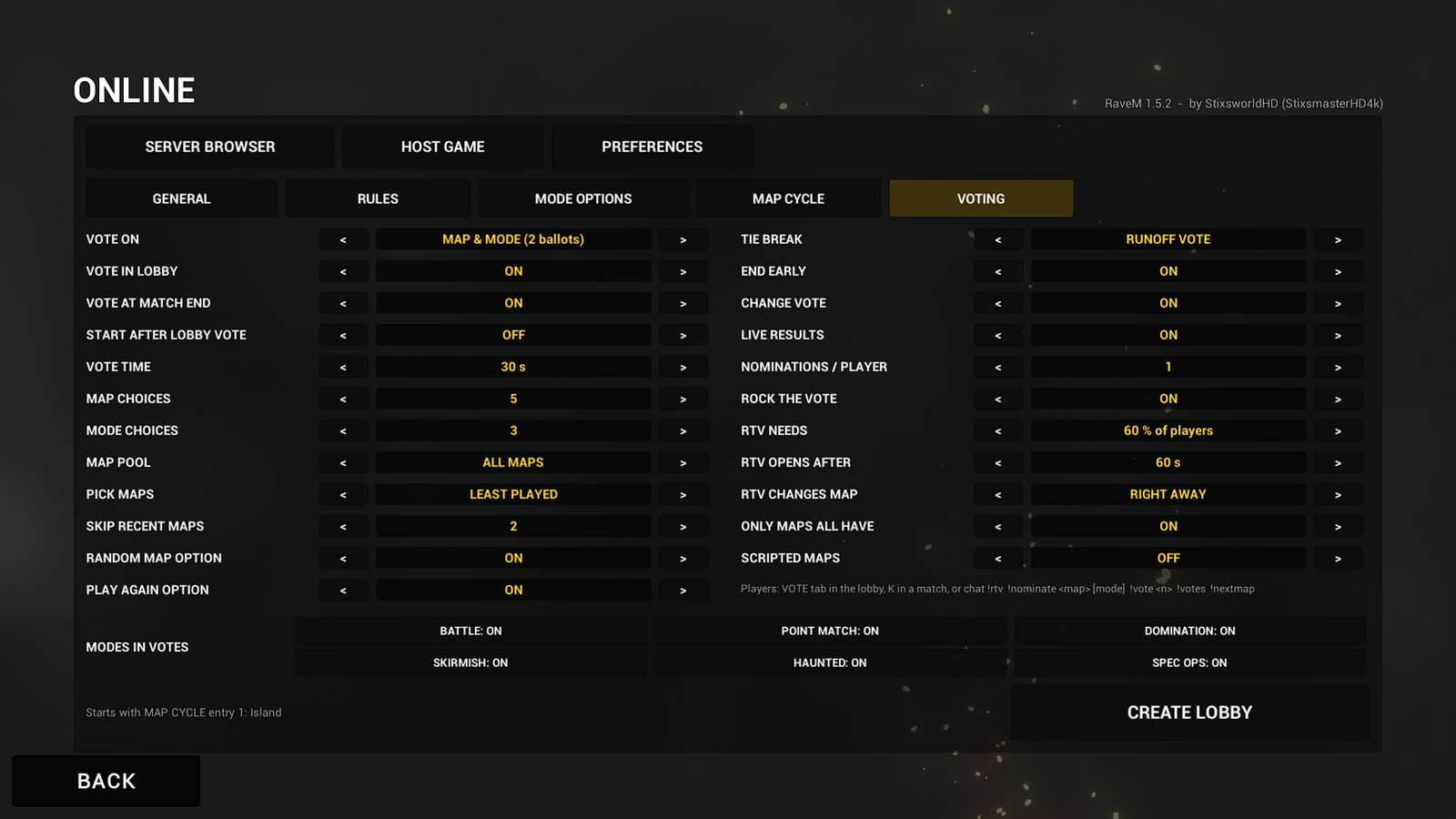
| Rule | Default | What it does |
|---|---|---|
| VOTE ON | MAP & MODE | What players vote on: MAP, GAME MODE, MAP & MODE (two ballots) or MAP + MODE PAIRS (one ballot). OFF turns voting off. |
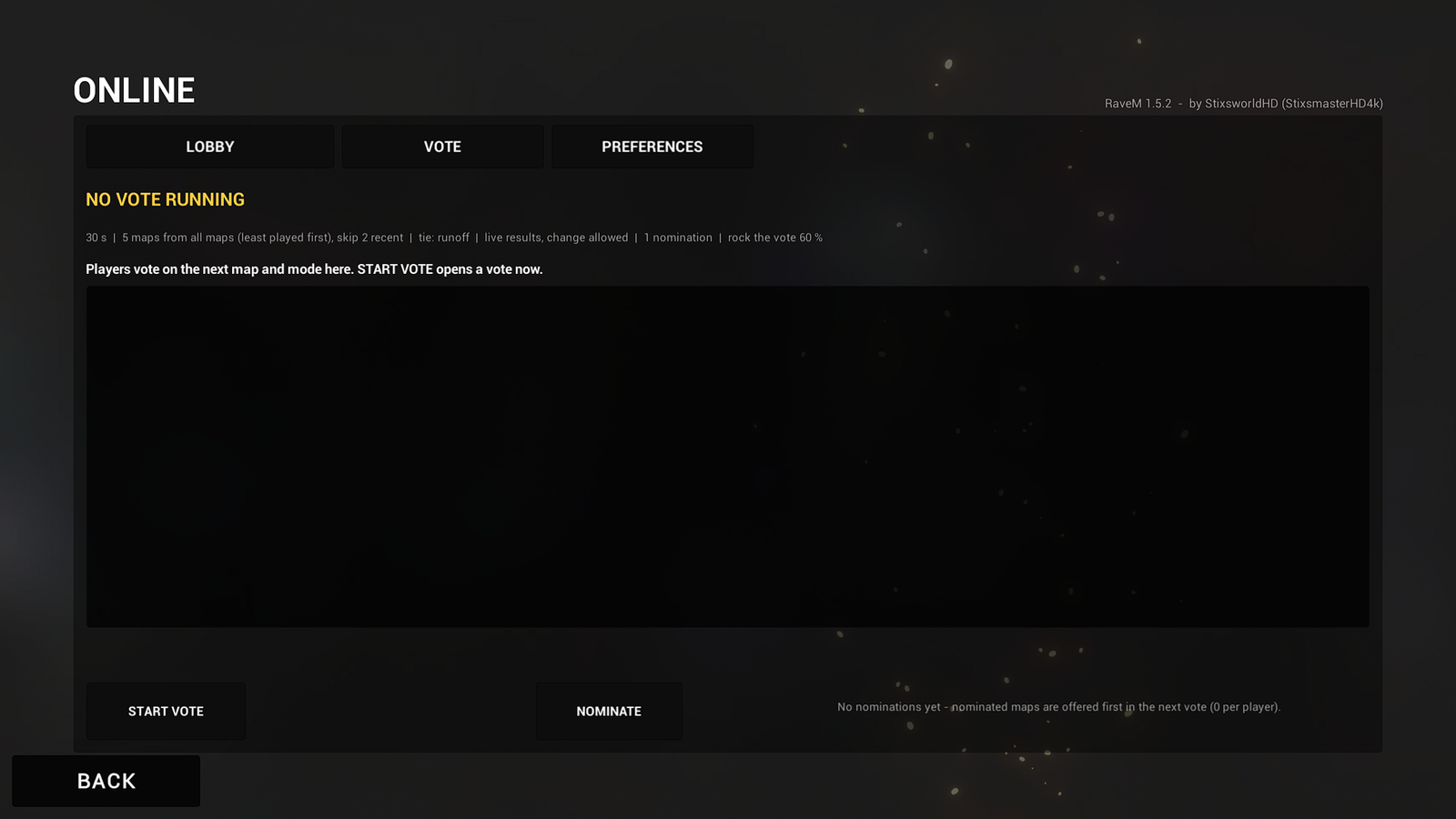
| VOTE IN LOBBY | ON | The host can start a vote from the lobby's VOTE tab. |
| VOTE AT MATCH END | ON | A vote opens whenever a match ends, after a victory or a defeat, and the winner loads for everyone. Takes over from AUTO NEXT MAP. If nobody votes, the next MAP CYCLE map loads. |
| START AFTER LOBBY VOTE | OFF | Starts the match 5 seconds after a lobby vote ends. |
| VOTE TIME | 30 s | How long a vote stays open, 10 to 180 s. A runoff lasts at most 15 s. |
| MAP CHOICES | 5 | Maps offered per vote, 2 to 9, plus the special options. |
| MODE CHOICES | 3 | Game modes offered on the mode ballot, 2 to 8. |
| MAP POOL | ALL MAPS | Where offered maps come from: ALL MAPS, BUILT-IN, CUSTOM (installed) or MY MAP CYCLE. |
| PICK MAPS | LEAST PLAYED | How offered maps are chosen after nominations: LEAST PLAYED, RANDOM or CYCLE ORDER. |
| SKIP RECENT MAPS | 2 | Recently played maps left out, 0 to 5. |
| RANDOM MAP OPTION | ON | Adds RANDOM MAP: a pool map that wasn't listed. |
| PLAY AGAIN OPTION | ON | Adds PLAY AGAIN (the map just played) to end-of-match votes. |
| TIE BREAK | RUNOFF VOTE | RUNOFF VOTE between the tied options (once, then random), RANDOM, HOST DECIDES (20 s, then random) or FIRST LISTED. A vote with no votes at all is not a tie (see When nobody votes). |
| END EARLY | ON | Closes the vote as soon as everyone has voted. |
| CHANGE VOTE | ON | Players may change or take back their vote until it closes. |
| LIVE RESULTS | ON | Shows the counts while voting. Off: revealed when the vote closes. |
| NOMINATIONS / PLAYER | 1 | Maps each player may nominate, 0 to 3. Nominated maps are offered first. |
| ROCK THE VOTE | ON | Players can ask for a map change during a match. Enough requests start a vote with KEEP PLAYING. |
| RTV NEEDS | 60 % of players | Share of players needed to start a rock-the-vote, 10 to 100 %. |
| RTV OPENS AFTER | 60 s | Seconds into a match before rock the vote opens, 0 to 900. |
| RTV CHANGES MAP | RIGHT AWAY | RIGHT AWAY, or AT MATCH END. |
| ONLY MAPS ALL HAVE | ON | Options some players don't have are marked and can't win. |
| SCRIPTED MAPS | OFF | Includes maps that bring their own game mode (they may ignore the voted mode). |
| MODES IN VOTES | all ON | One switch per game mode. At least 2 stay on. |
Offered maps follow Ravenfield's own Instant Action rules: maps hidden from Instant Action are never offered. Every player's game reports the offered maps it lacks, and each option shows how many players are missing it.
When nobody votes
A vote that closes without a single vote isn't a tie. This applies to every vote: at the end of a match, in the lobby and after rock the vote.
- The next map in the host's MAP CYCLE list wins, with that entry's game mode and day or night setting, and the cycle carries on from there. Maps the host doesn't have are skipped, and the list is used even when the MAP CYCLE rule is off.
- Without a cycle list, a real map from the ballot wins: the first one listed when TIE BREAK is FIRST LISTED, otherwise a random one. It's never KEEP PLAYING or PLAY AGAIN.
As soon as one player votes, the most votes win and ties follow TIE BREAK.
In the lobby
 (opens the full-size 1920 by 1080 image)
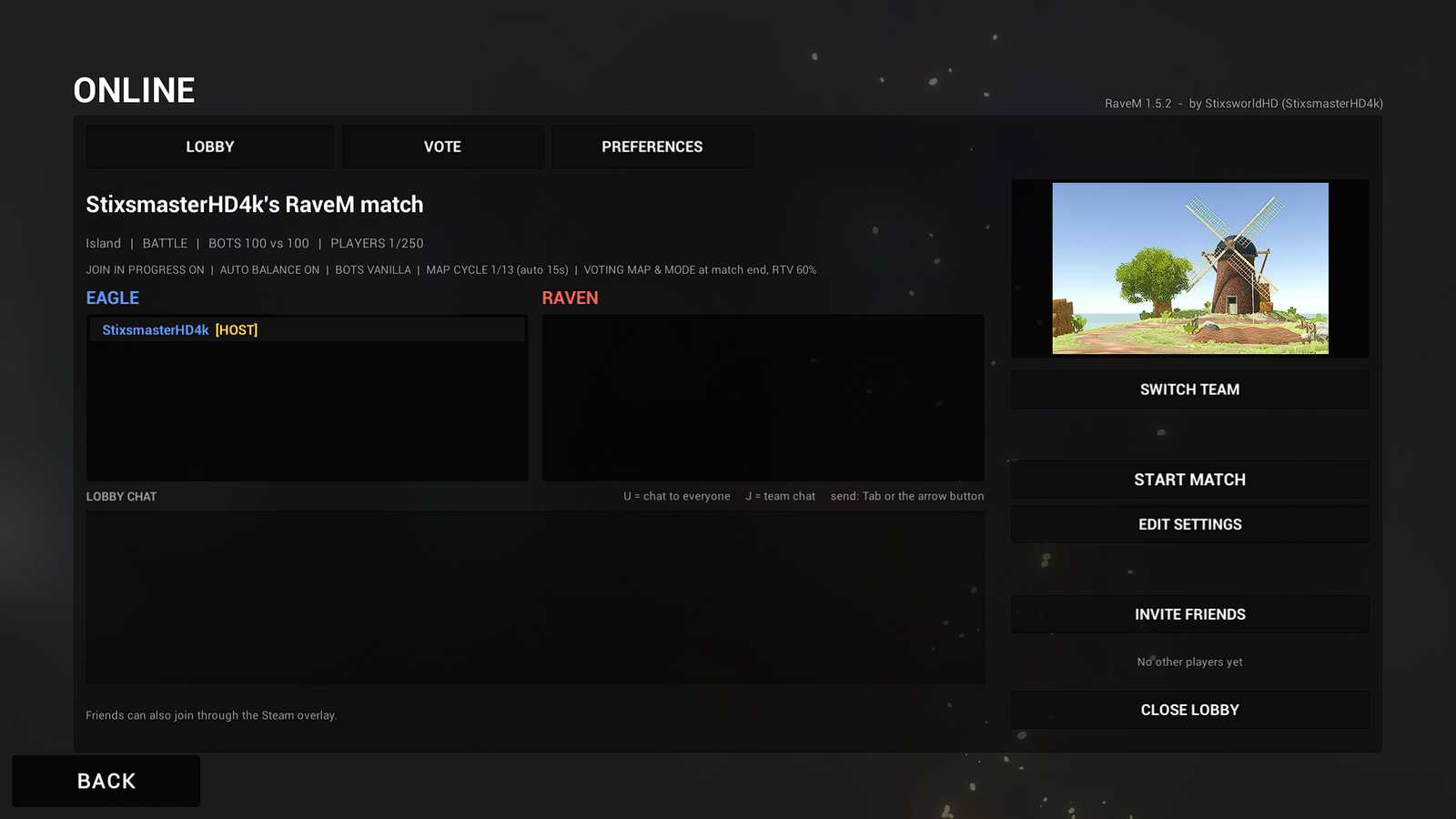
The line under the lobby name repeats the match (map, mode, bots per team and players), then the rules in short.
- Teams. The EAGLE and RAVEN lists show who's where. SWITCH TEAM moves you when the host allows it.
- READY. Players press READY when they're set; the host is always ready. A counter under INVITE FRIENDS shows something like READY 3/5 and who is still missing. If you don't have the lobby's map, the button reads GET THE MAP FIRST.
- Host buttons. START MATCH (it reads WAITING FOR READY while REQUIRE READY holds it), EDIT SETTINGS, INVITE FRIENDS (LAN ADDRESS in a LAN game), KICK on a player's row and CLOSE LOBBY.
- Muting. Each player row has MUTE, which only affects you. The host also has SILENCE: nobody hears that player.
- Lobby chat. U talks to everyone, J to your team. Send with Tab or the arrow button.
- Loading together. The match starts for everyone once all players have loaded, or after a time limit (120 s by default). A banner shows who's still loading. Late joiners drop straight in.
 (opens the full-size 1920 by 1080 image)
INVITE FRIENDS opens Steam's own invite list. Friends can also join you from the Steam overlay.
The VOTE tab
 (opens the full-size 1920 by 1080 image)
The host's START VOTE opens a vote straight away. NOMINATE opens a searchable map list (pick a mode too for MAP + MODE PAIRS votes), and WITHDRAW takes your nomination back. During a vote, click an option to vote and click it again to take the vote back. The winner becomes the lobby's map and mode for the next START MATCH. If nobody votes, the next MAP CYCLE map wins (see When nobody votes).
In a match
- Player list and stats. Hold P for every player with their ping (up to 6 columns in big lobbies). Insert toggles network statistics.
- Voting mid-match. K opens the vote window; click to vote, then K or Esc closes it.
While it's open your clicks never reach the game. ROCK THE VOTE in that window, or typing
!rtv, asks for a map change. - Pausing doesn't stop the match online. The host's RESTART takes everyone back to the lobby.
- Killcams. When someone kills you, you watch the last seconds before your death from your killer's side, then your fall, if the host's MODE OPTIONS have KILLCAM on. Backspace skips it when the host allows; Fire respawns you as usual and never skips, and respawning ends the killcam.
- Auto spawn. With the host's AUTO SPAWN on, RaveM presses DEPLOY for you after AUTO SPAWN AFTER and, with WAIT FOR THE KILLCAM, once your killcam is over. The game then spawns you in its next spawn wave (every RESPAWN TIME, once you've been dead for more than 6 s); its own "SPAWNING AT" countdown shows when. Auto spawn makes sure a spawn point your team owns is selected, and opens the deploy screen if your team owns none. Your first loadout of the match is still your choice, and USE AUTO SPAWN in PREFERENCES lets you opt out.
- End of the match. Whichever team wins, the host gets NEXT MAP (or PLAY AGAIN without a cycle) and RETURN TO LOBBY. With VOTE AT MATCH END on, everyone votes on the next map instead; otherwise AUTO NEXT MAP loads it after its countdown. With FINAL KILLCAM AT MATCH END on, everyone also sees the match's last kill.
- Spec Ops and Haunted. Online, one player's death doesn't end the mission: the fallen stay down and watch their killcam, and when the last player is down the mission fails for everyone, with the final killcam and the vote. Surviving every Haunted wave ends the same way.
Keys and chat commands
| Key | What it does |
|---|---|
| U | Chat to everyone |
| J | Chat to your team |
| Tab or the arrow button | Send the message you're typing (Enter only with ENTER ALSO SENDS on) |
| Esc | Cancel typing |
| Hold P | Player list with pings |
| Insert | Network statistics overlay |
| K | Vote window during a match |
| Hold H | Talk to players near you (and on your vehicle's intercom) |
| Hold ` | Team radio. It's the BackQuote key, above Tab. |
| Backspace | Skip the killcam, when the host allows it |
None of these are Ravenfield controls. At startup, and whenever you save new controls in Ravenfield's options, RaveM compares its keys with your own Ravenfield bindings and moves any key that clashes to a free one, with a message on screen. Typing in chat never moves your soldier or opens your mic.
Chat commands
| Type in chat | Who | What it does |
|---|---|---|
!rtv | Everyone | Ask for a map change (rock the vote). rtv and rockthevote work too. |
!nominate <map> [mode] | Everyone | Nominate a map, for example !nominate river delta point match. Part of a name is enough. |
!unnominate | Everyone | Take your nomination back |
!vote <n> [n] | Everyone | Vote by the option numbers shown in the list |
!votes !nextmap !votehelp | Everyone | Vote status, the next map, and the list of vote commands |
/mute name /unmute name /mutes | Everyone | Your own voice mutes. They stay on your PC. |
/volume name 150 | Everyone | One player's voice volume, 0 to 200 % (/vol works too) |
/silence name /unsilence name | Host | Nobody hears that player; everyone sees MUTED next to their name |
Vote commands are handled by the host and aren't shown as chat. Voice commands also work with ! instead of /, and are never sent as chat.
Your preferences
 (opens the full-size 1920 by 1080 image)
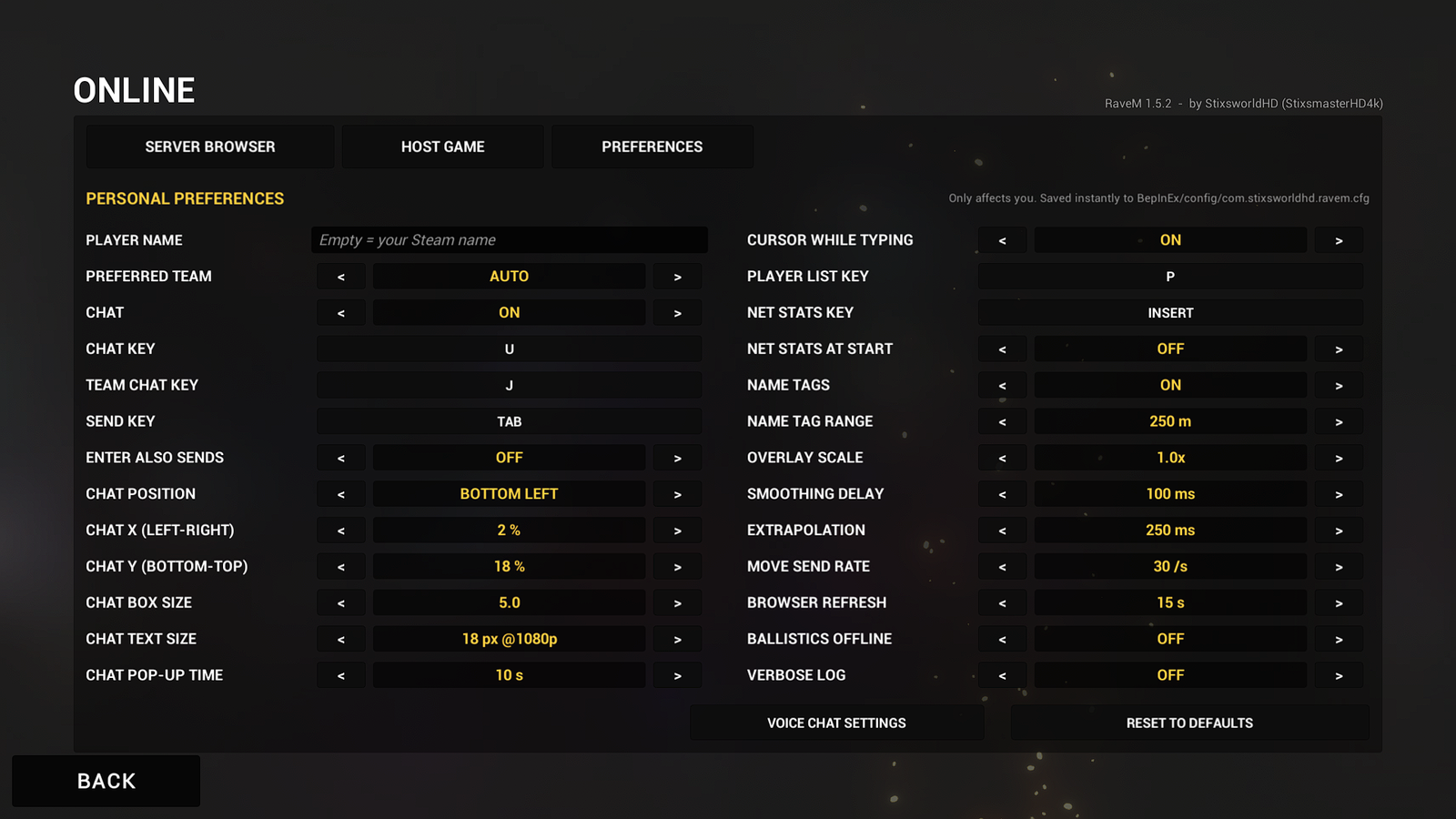
PREFERENCES only affect you and save instantly to com.stixsworldhd.ravem.cfg. You can also open them from a lobby.
The button at the bottom cycles through the four pages: general, VOICE CHAT SETTINGS, PLAYER VOICES and KILLCAM & SPAWNING.
| Setting | Default | What it does |
|---|---|---|
| PLAYER NAME | Your Steam name | The name other players see. Leave it empty to use your Steam name. |
| PREFERRED TEAM | AUTO | The team you ask for: AUTO, EAGLE or RAVEN. The host's AUTO BALANCE wins. |
| CHAT | ON | Text chat in lobbies and matches. |
| CHAT KEY, TEAM CHAT KEY, SEND KEY | U, J, TAB | Click a key box, then press the new key. Keys Ravenfield uses are refused. |
| ENTER ALSO SENDS | OFF | Off by default because Enter is Ravenfield's Open Loadout key. |
| CHAT POSITION, CHAT X, CHAT Y | BOTTOM LEFT, 2 %, 18 % | Nine one-click presets, then fine placement as a share of the free screen space. Previewed live. |
| CHAT BOX SIZE, CHAT TEXT SIZE | 5.0, 18 px @1080p | Box size, and text size in pixels at 1080p. Both scale with your resolution. |
| CHAT POP-UP TIME | 10 s | How long the chat pops up when anyone sends a message, 0 to 60 s. 0 = only when you open it. |
| CURSOR WHILE TYPING | ON | Shows the mouse while you type, so you can click the send arrow. |
| PLAYER LIST KEY, NET STATS KEY | P, INSERT | Hold P for the player list with pings; Insert toggles the network stats overlay. |
| NET STATS AT START | OFF | Shows the network stats overlay automatically in matches. |
| NAME TAGS, NAME TAG RANGE | ON, 250 m | Team-coloured tags above other human players, hidden beyond the range. |
| OVERLAY SCALE | 1.0x | Size of RaveM's in-game overlays, 0.5 to 2.0. |
| SMOOTHING DELAY | 100 ms | How far in the past other soldiers are drawn so their movement stays smooth, 0 to 500 ms. Lower is more up to date but jittery on bad connections. |
| EXTRAPOLATION | 250 ms | How long a soldier keeps moving on its last known speed when packets stop arriving, 0 to 1000 ms. |
| MOVE SEND RATE | 30 /s | How many times per second your movement is sent to the host, 5 to 60. |
| BROWSER REFRESH | 15 s | The server browser refreshes itself this often while open, 0 to 120 s. 0 = off. |
| BALLISTICS OFFLINE | OFF | Also use RaveM's bullet physics (air drag, wind) in offline Instant Action and Campaign. |
| VERBOSE LOG | OFF | Writes detailed network diagnostics to BepInEx\LogOutput.log. |
KILLCAM & SPAWNING
The fourth PREFERENCES page, added in 1.6.0, controls the killcams on your own screen. The host's MODE OPTIONS decide whether there are killcams at all.
| Setting | Default | What it does |
|---|---|---|
| SHOW KILLCAMS | ON | Show killcams and the final killcam, when the host's MODE OPTIONS allow them. |
| MY KILLCAM CAMERA | KILLER'S EYES | Your camera when the host leaves the choice to players: KILLER'S EYES, OVER THE SHOULDER or CINEMATIC. |
| SKIP KILLCAM KEY | Backspace | Skips a killcam when the host allows it. Fire never skips, because Ravenfield respawns you with it. |
| KILLCAM HUD | ON | The killcam panel on the right (KILLCAM, the killer, weapon, distance, health, camera) and the progress bar. |
| RECORDING RATE | 20 fps | How often soldiers and vehicles are recorded for killcams, 10 to 30. Smoother replays cost a little more CPU and memory. |
| RECORD SOLDIERS WITHIN | 800 m | Farther soldiers keep their last recorded pose in killcams (100 to 5000 m). |
| KEEP ANIMATING WITHIN | 250 m | Ravenfield stops animating AI soldiers nobody can see; within this distance RaveM keeps them animating while recording, so killers are never frozen (0 = the game's default). |
| SHOW SOLDIERS WITHIN | 150 m | Soldiers and vehicles this close to the killer or the victim appear in the killcam (25 to 2000 m). |
| MUTE BATTLE SOUND | ON | Silences the live battle while a killcam plays; voice chat keeps playing. |
| USE AUTO SPAWN | ON | Follow the host's AUTO SPAWN. Off: you always deploy yourself. |
Voice chat
 (opens the full-size 1920 by 1080 image)
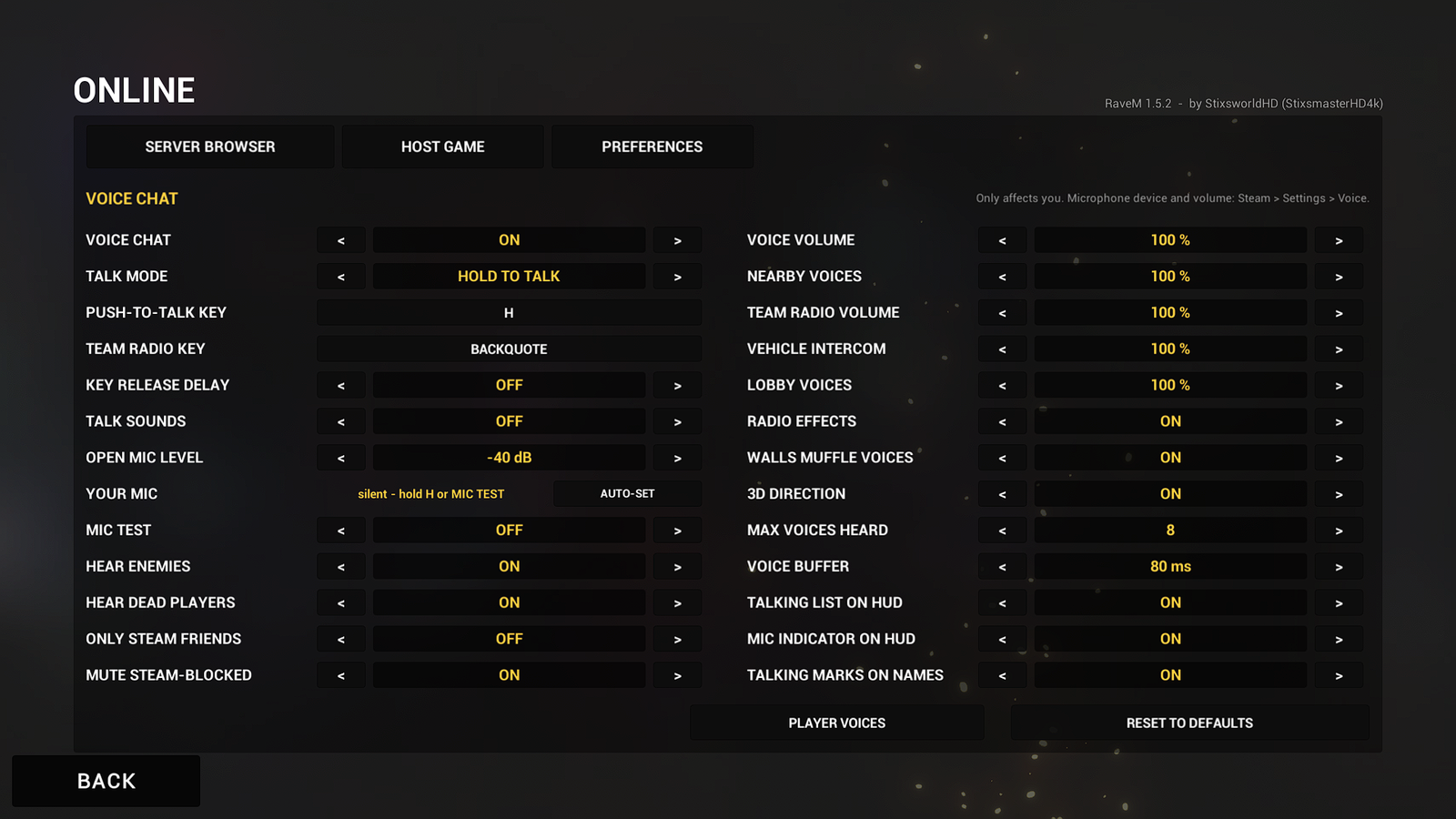
Your microphone is Steam's: choose the device and its volume in Steam > Settings > Voice. Everything else lives under PREFERENCES > VOICE CHAT SETTINGS.
- Talking. Hold H and players within the host's VOICE RANGE hear you from where you stand; walls and hills muffle you. Hold ` and your whole team hears you on the radio. In a vehicle, everyone aboard hears each other on the intercom. In the lobby, everyone hears everyone.
- TALK MODE: HOLD TO TALK, TOGGLE TO TALK (press once to start, again to stop) or OPEN MIC, which sends you whenever you're louder than OPEN MIC LEVEL.
- Setting up your mic. YOUR MIC shows a live level meter. MIC TEST plays your own voice back, and switches off by itself when a match starts. For open mic, press AUTO-SET and talk normally for 4 seconds: RaveM sets OPEN MIC LEVEL just below your quietest speech.
- What you hear. VOICE VOLUME plus your own mix of NEARBY VOICES, TEAM RADIO VOLUME, VEHICLE INTERCOM and LOBBY VOICES (each 0 to 200 %). RADIO EFFECTS, WALLS MUFFLE VOICES and 3D DIRECTION switch the sound effects; MAX VOICES HEARD (8) and VOICE BUFFER (80 ms) handle crowds and bad connections.
- Filters. HEAR ENEMIES, HEAR DEAD PLAYERS, ONLY STEAM FRIENDS and MUTE STEAM-BLOCKED (on by default: you never hear players you blocked on Steam).
- On screen. TALKING LIST ON HUD, MIC INDICATOR ON HUD and TALKING MARKS ON NAMES switch each element separately.
 (opens the full-size 1920 by 1080 image)
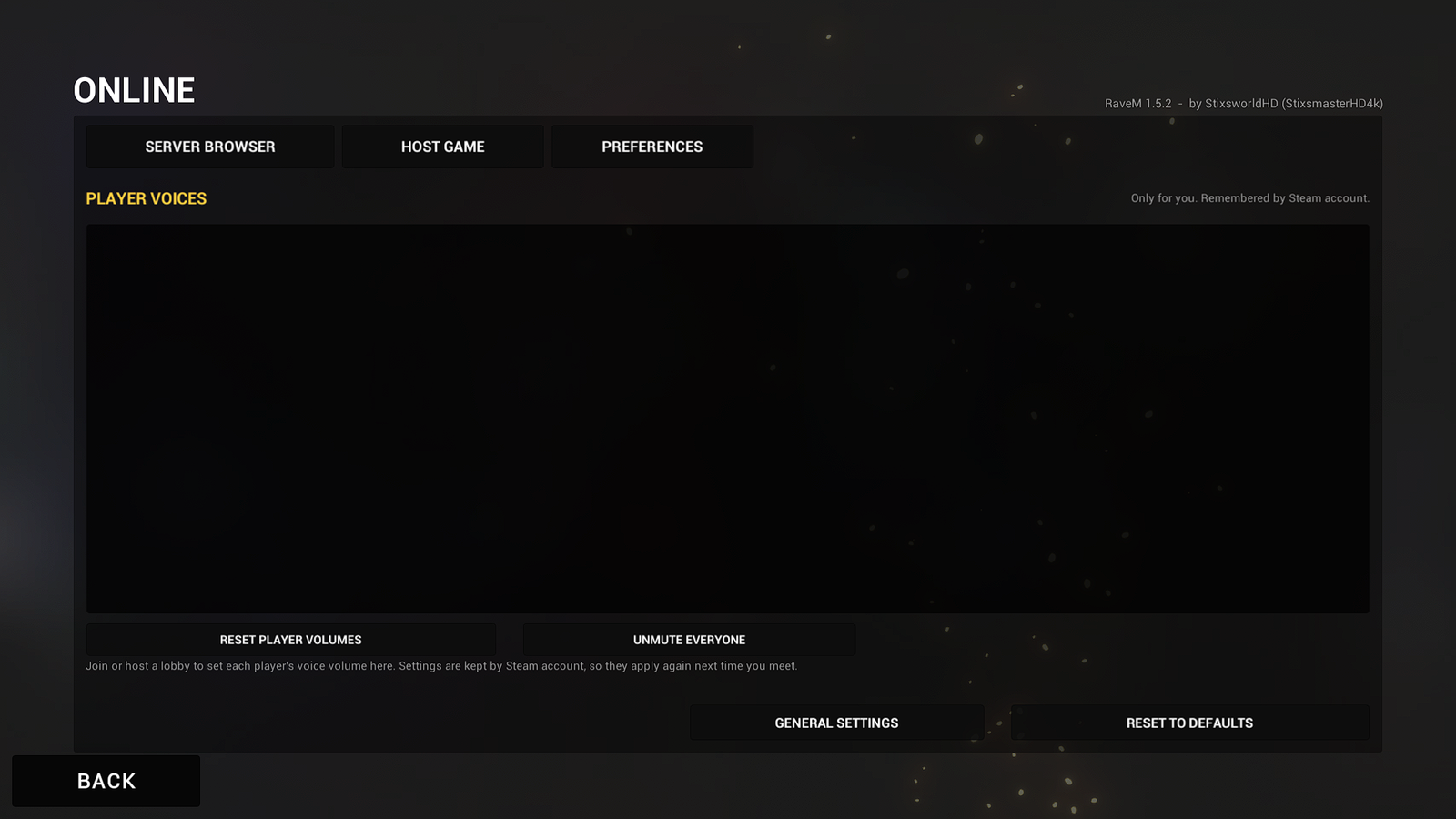
PLAYER VOICES lists every other player in your lobby with their team colour, a volume control (− and +, 10 % steps, Shift for 50 %) and MUTE. RESET PLAYER VOLUMES and UNMUTE EVERYONE reset all of them. Your choices are remembered by Steam account, so they apply again the next time you meet that player.
Good to know
How all of this works behind the menus, with every number and setting, is on the Features page.
- If the host quits, the match ends for everyone. There's no host migration.
- Voice goes through the host, which relays it to the players the rules allow. The host's upload grows with the number of people talking at once.
- For big lobbies, set
HostUploadMbpsin the[2. Network]section of the settings file to about 70 % of your real upload speed (default 25). In a match, Insert shows the per-player budget; if Send failures rises above 0, lower it. - Workshop content you download while Ravenfield runs only loads after a restart.
- Voice has its own VOICE VOLUME. Ravenfield's volume sliders don't change it, and it plays in stereo.