3Step 3 of 4
Put RaveM into BepInEx\plugins
RaveM is eleven DLL files, and they all go in one folder: BepInEx\plugins inside your Ravenfield folder. Then you start the game and look for the ONLINE tile.
Before you start
- BepInEx is installed and the game has been started once, so
BepInEx\pluginsexists. No plugins folder? Go back to Step 1. RaveM_v1.7.1.raris extracted to its own folder (Step 2).- Ravenfield is closed.
Copy the eleven DLLs into BepInEx\plugins
Open the folder you extracted the archive to.
Select the eleven
.dllfiles and leaveREADME.mdout: press Ctrl + A, then hold Ctrl and clickREADME.mdto unselect it. Copy with Ctrl + C.Open
BepInEx\pluginsin your game folder. On a default Steam install that's:C:\Program Files (x86)\Steam\steamapps\common\Ravenfield\BepInEx\pluginsPaste the path into File Explorer's address bar and press Enter to jump straight there.
Paste with Ctrl + V. Updating from an older RaveM? Choose Replace the files in the destination.
Your plugins folder should now look exactly like this: eleven files and nothing else.
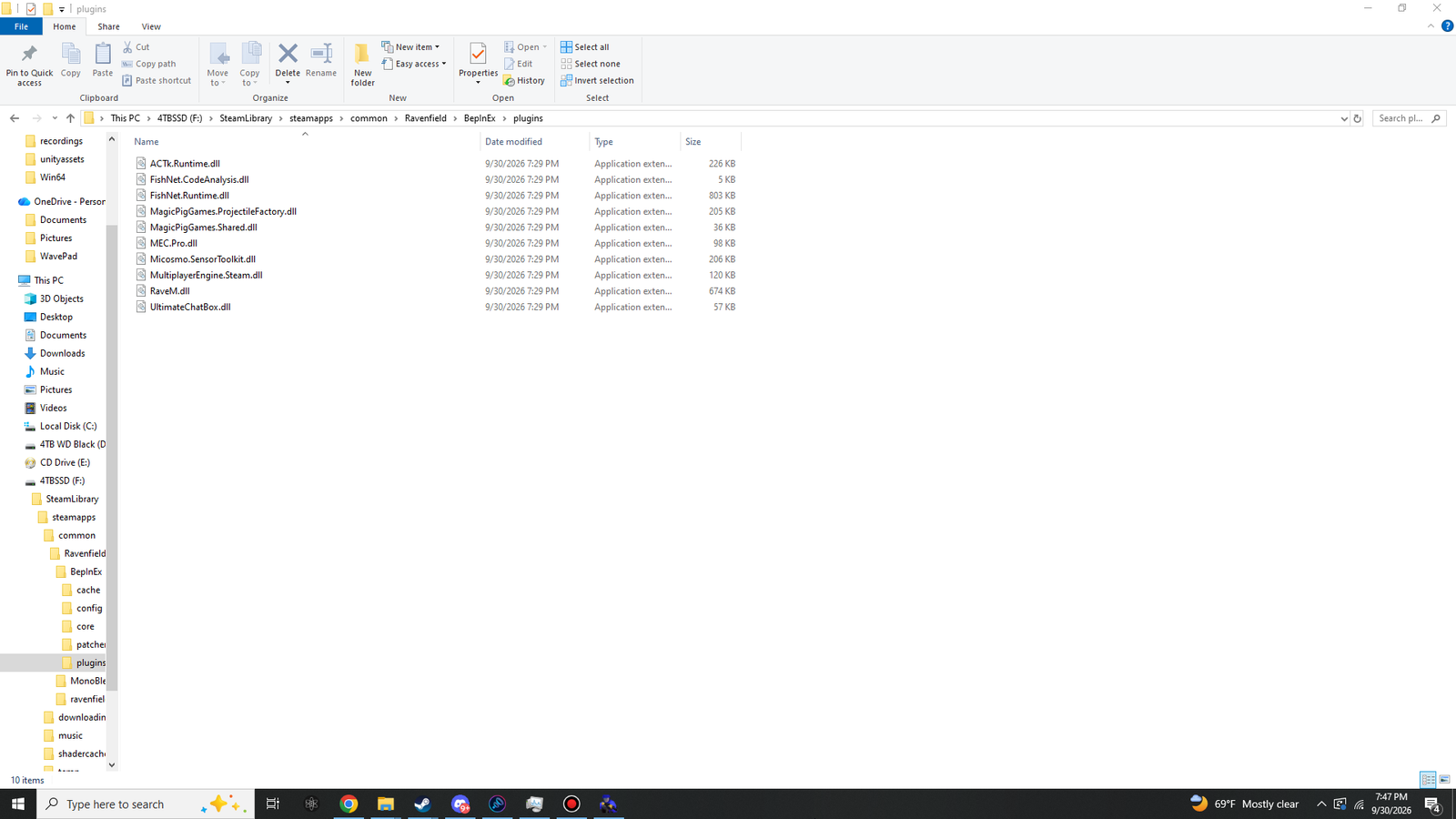 (opens the full-size 1920 by 1080 image)
- BepInEx\
- plugins\
- ACTk.Runtime.dllRaveM archive226 KB
- FishNet.CodeAnalysis.dllRaveM archive5 KB
- FishNet.Runtime.dllRaveM archive803 KB
- MagicPigGames.ProjectileFactory.dllRaveM archive205 KB
- MagicPigGames.Shared.dllRaveM archive36 KB
- MEC.Pro.dllRaveM archive98 KB
- Micosmo.SensorToolkit.dllRaveM archive206 KB
- MultiplayerEngine.Steam.dllRaveM archive120 KB
- RaveM.dllRaveM archive765 KB
- UltimateChatBox.dllRaveM archive57 KB
- UltimateReplay.dllRaveM archive239 KB
- plugins\
Sizes as File Explorer shows them for RaveM 1.7.1. The screenshot was taken with RaveM 1.5.2, so File Explorer shows RaveM.dll as 674 KB there; in 1.7.1 it is 765 KB. 1.7.1 also adds UltimateReplay.dll (239 KB), which the screenshot doesn't show. The other nine DLLs are byte-for-byte the same in both versions.
RaveM DLLs in BepInEx\plugins
Ticks off this check on the READY board. Saved in this browser only.
Start Ravenfield and find ONLINE
Start Steam and sign in, then start Ravenfield from Steam. RaveM needs Steam for lobbies, networking and voice.
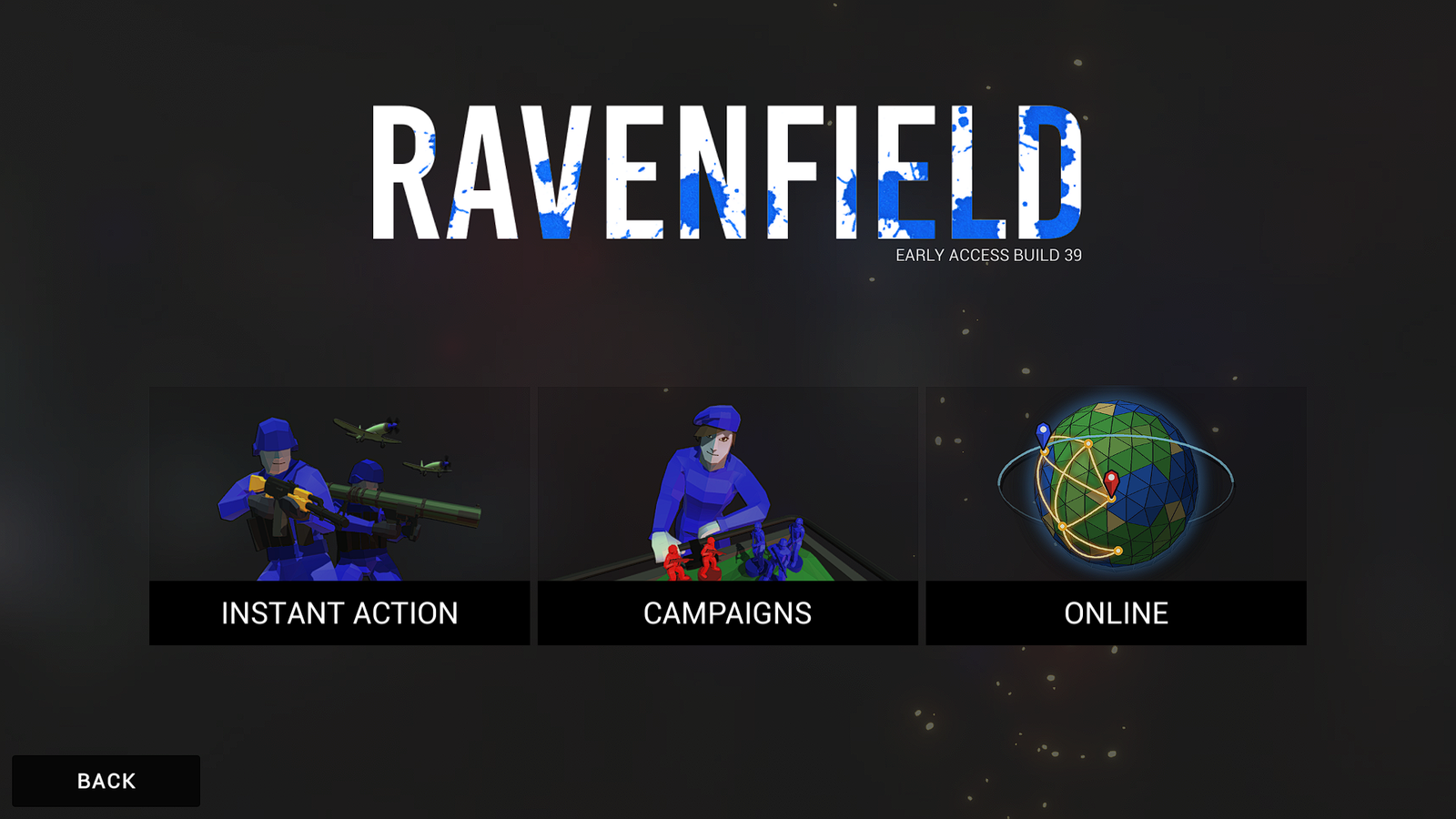
In the main menu, open PLAY. A third tile, ONLINE, now sits beside INSTANT ACTION and CAMPAIGNS.
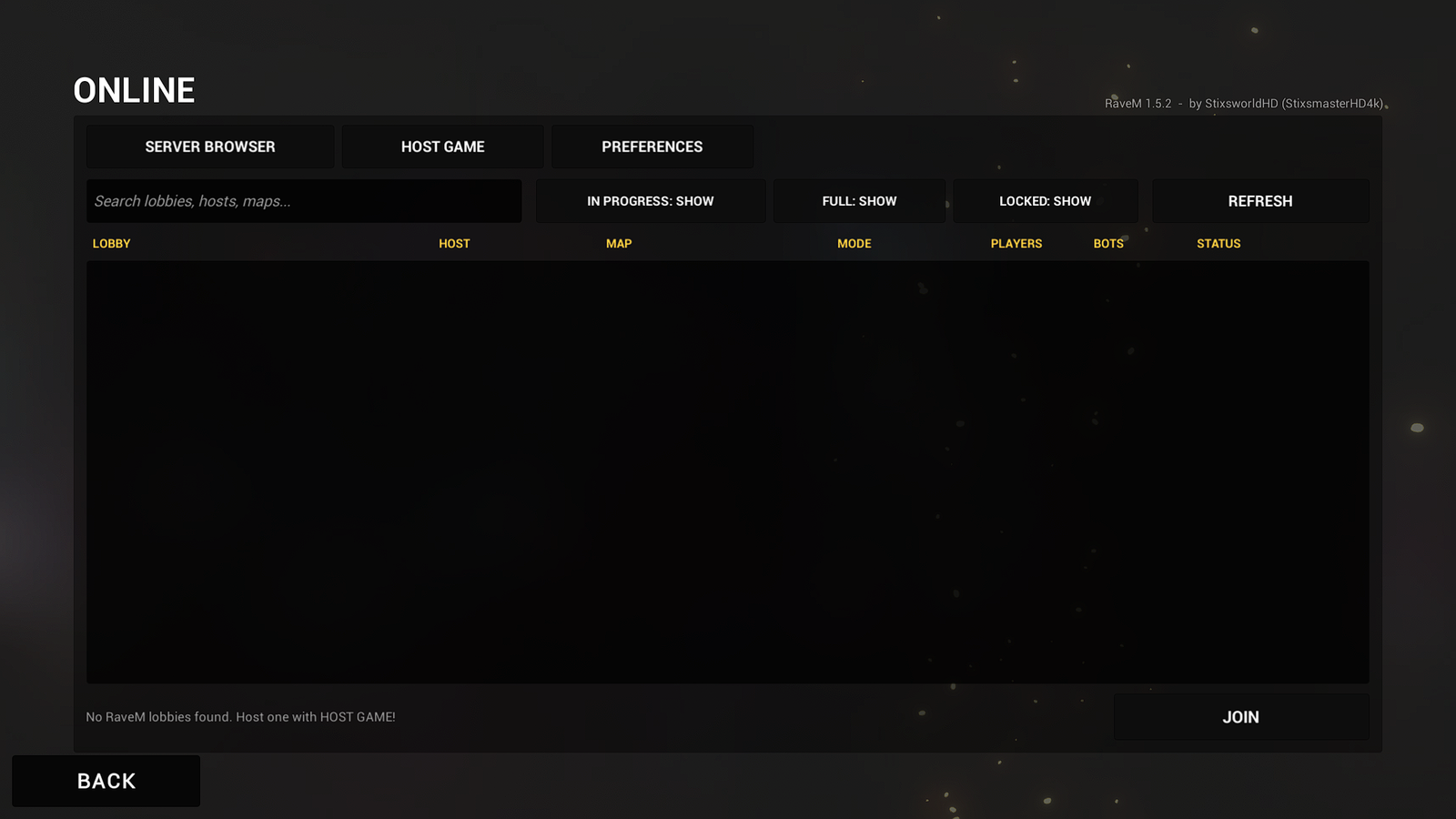
Open ONLINE. The top right reads RaveM 1.7.1 - by StixsworldHD (StixsmasterHD4k).
 (opens the full-size 1920 by 1080 image)
 (opens the full-size 1920 by 1080 image)
These screenshots were taken with RaveM 1.5.2. In 1.7.1 the version label in the top-right corner reads RaveM 1.7.1. SERVER BROWSER has a DIRECT CONNECT button at the bottom for LAN games, MODE OPTIONS now also lists RaveM's own killcam, spawning, match and ballistics options after the game mode's, and PREFERENCES has a fourth page, KILLCAM & SPAWNING.
ONLINE tile shows in PLAY
Ticks off this check on the READY board. Saved in this browser only.
Confirm it in the log
For a second confirmation, quit the game and open BepInEx\LogOutput.log again. With RaveM installed you'll find these lines,
with RaveM's own lines in between:
[Info   :   BepInEx] 1 plugin to load
[Info   :   BepInEx] Loading [RaveM 1.7.1]
[Message:   BepInEx] Chainloader startup complete
RaveM's plugin details, read from RaveM.dll: ID com.stixsworldhd.ravem, name RaveM, version 1.7.1,
and it only loads inside ravenfield.exe.
See Error loading [RaveM 1.7.1] instead, or no RaveM line at all? Go to BepInEx works, but there's no ONLINE tile.
The settings file RaveM creates
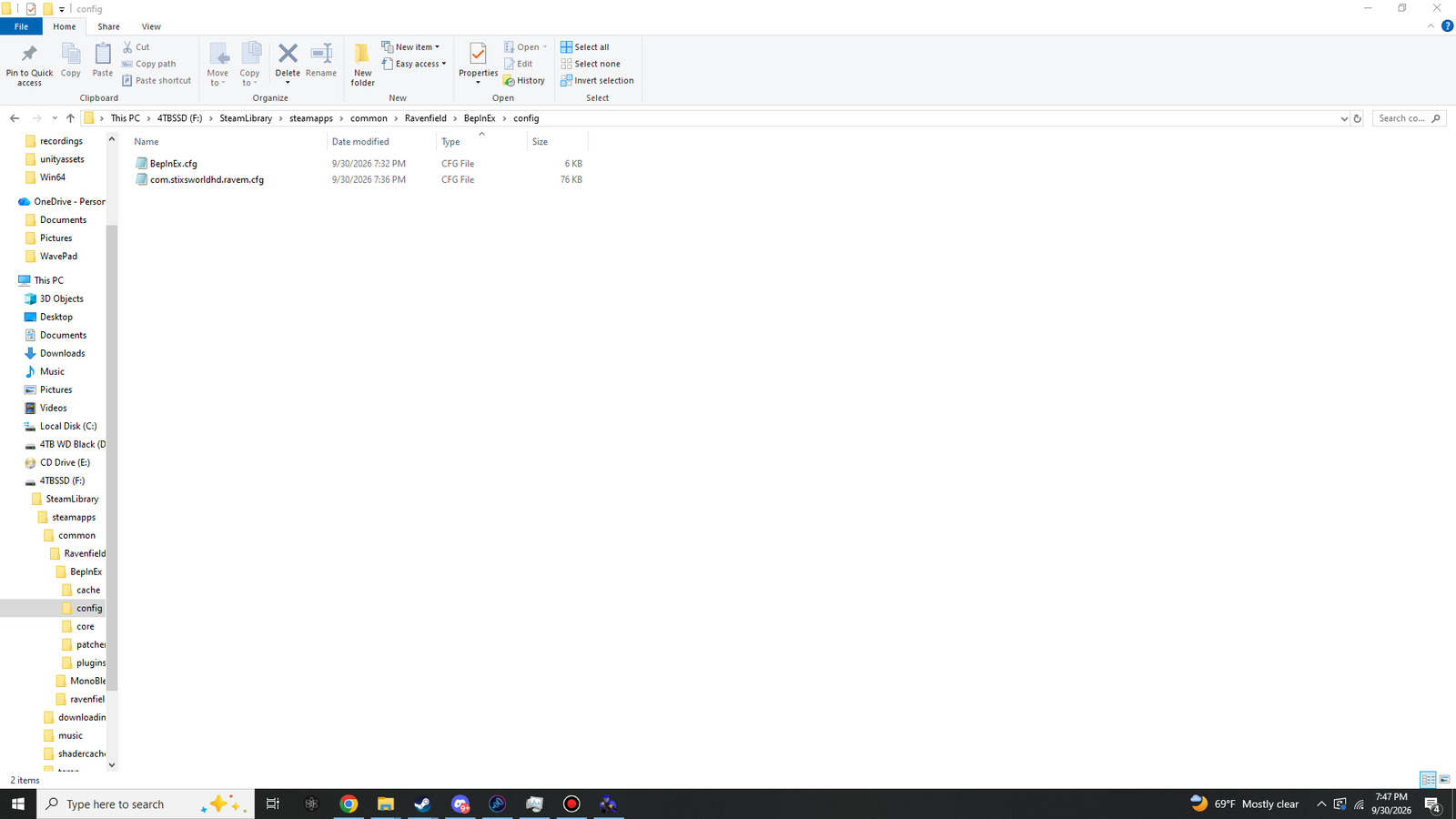
That first start with RaveM also created BepInEx\config\com.stixsworldhd.ravem.cfg. It holds all 157 RaveM settings,
each with its allowed range, its default and a short gamer tip, grouped into sections such as General, Network, Chat, Interface, Voting and Voice.
Every setting is listed on the Features page.
 (opens the full-size 1920 by 1080 image)
- Changes in PREFERENCES are saved to it instantly, and your HOST GAME settings are remembered for next time.
- To edit it by hand, close the game first: RaveM rewrites the file whenever a setting changes in game.
As you use more features, RaveM adds these next to it:
| In BepInEx\config | What it keeps |
|---|---|
RaveM_MapCycles\ | Map cycles you saved on HOST GAME > MAP CYCLE |
RaveM_VoteStats.txt | The host's play history (plays per map and the last 12 maps), used for fair map votes |
RaveM_VoiceVolumes.txt | Your voice volume for each player, remembered by Steam account |
RaveM_VoiceMutes.txt | The players you muted, remembered by Steam account |
RaveM_bans.txt | SteamIDs your anti-cheat banned, only when its Action is set to Ban |
The fresh install in the screenshot doesn't have them yet. They appear once you use those features.
Playing with friends
- Everyone in a lobby needs a RaveM that speaks the same network protocol. 1.7.1 uses protocol 8, so everyone needs RaveM 1.7.1. The server browser marks lobbies on another protocol with a red VERSION status, and they can't be joined.
- Players also need the lobby's map and game mode, plus any weapon or vehicle mods the host runs. When something's missing, RaveM's Workshop window lists it with a one-click GET.
- Send your friends this guide: everything they need is on these pages.